PC dying completely — not a crash-to-desktop, but a full hard reset — every time Arc Raiders gets going? That’s not your graphics card failing. It’s the game slamming into your PC’s safety limits. And the community has found the exact levers that stop it.
Why This Happens
A whole-PC hard crash — screen dead, fans blasting, forced reboot — usually means hardware protection tripped. Not that the hardware is broken.
Arc Raiders spikes GPU and power supply load to nearly 100% the instant it launches. Blame the default global illumination setting. Epic-tier lighting, applied before you ever see a menu. Your power supply sees the surge, panics, and cuts power — a safety feature doing its job against a rude game.
The freezes have different sources. Discord’s hardware acceleration collides with the game during voice calls. So does MSI Afterburner — the anti-cheat hates it. And a driver-level OpenGL quirk causes the random mid-match locks.
Fix 1 – Turn Off Discord Hardware Acceleration
Playing with friends in a Discord call? Start here. The desktop app’s hardware acceleration can hard-reset the entire PC mid-match.
1 – Open Discord and click the User Settings gear (bottom left, next to your name).
2 – Scroll down to System under App Settings.
3 – Toggle off Hardware Acceleration.
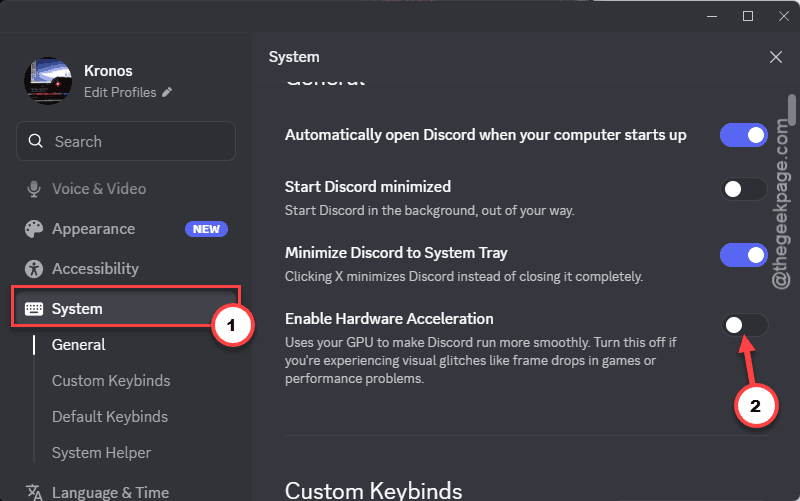
4 – Restart Discord, then launch Arc Raiders.
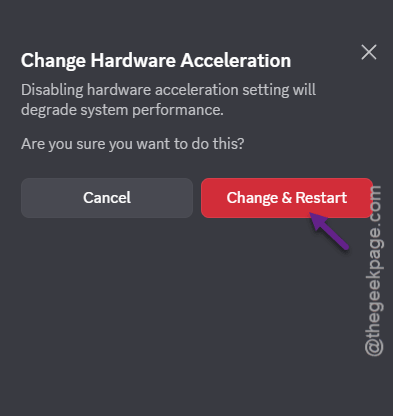
One player who switched to the browser version of Discord played for hours in a voice call without a single crash. So if the toggle alone doesn’t do it, run Discord in your browser on game nights.
Fix 2 – Flip Two NVIDIA Global Settings
The community fix. Two settings. That’s it. For some cards (the RTX 5070 Ti especially), players report this is the only thing that worked after trying every fix on every forum.
1 – Open the NVIDIA App.
2 – Go to Graphics, then Global Settings.
3 – Find OpenGL GDI compatibility and set it to Prefer compatible.
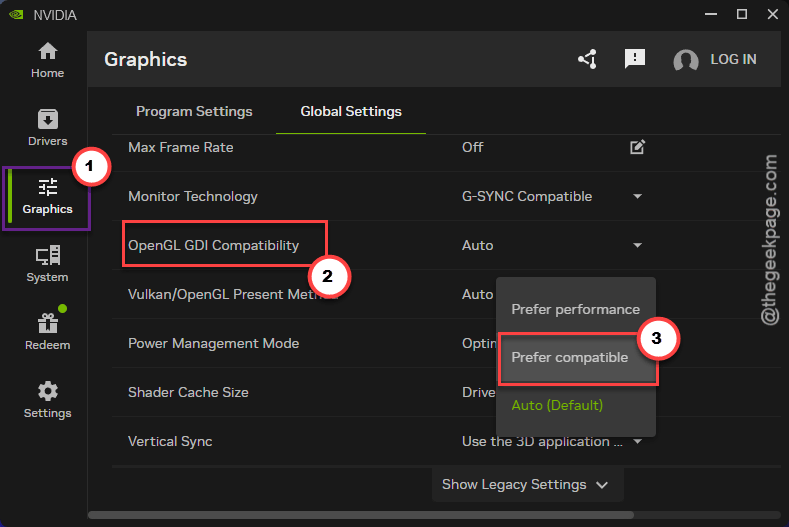
4 – In the same list, find Power management mode and set it to Prefer maximum performance.
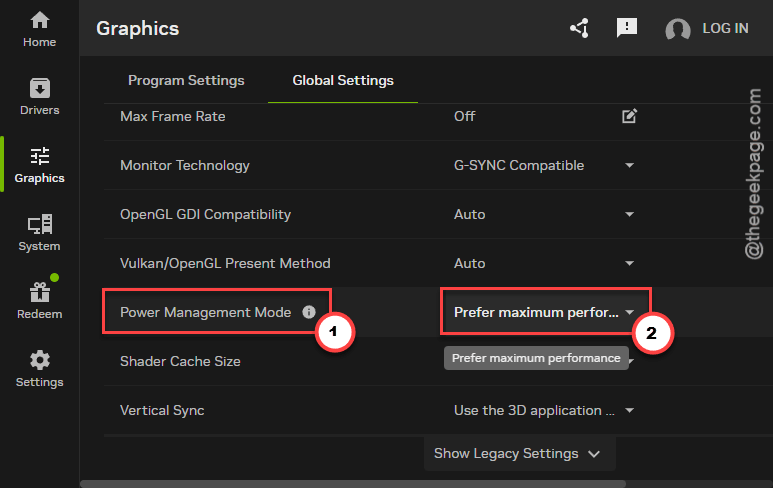
5 – Apply the changes, restart your PC, and launch the game.
Fix 3 – Cap GPU Power to 90% and Fix the Lighting
This stops the launch spike from tripping your power supply’s protection.
1 – Open the NVIDIA App and go to Settings, then Performance.
2 – Set Power Maximum to 90%.
3 – Set Voltage Maximum to 90%.
4 – Launch Arc Raiders and open the in-game graphics settings.
5 – Set NVIDIA RTX Global Illumination to Static.
Once Static lighting is saved, you can safely put the power limit back to 100% in the NVIDIA App. The surge came from the Epic global illumination default — with that gone, the spike goes with it.
Fix 4 – Close MSI Afterburner and RivaTuner
The anti-cheat and Afterburner do not get along. Hard freezes, not polite crashes.
1 – Look at your system tray (bottom right corner, near the clock).
2 – Right-click MSI Afterburner and close it.
3 – Do the same for RivaTuner Statistics Server — it runs as its own tray icon.
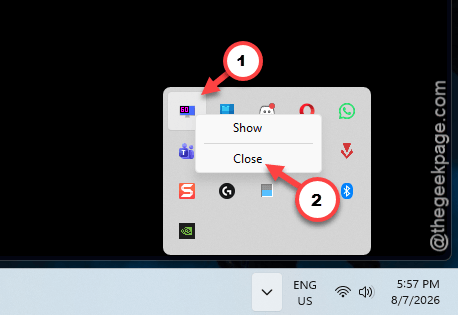
4 – Launch the game.
Your overlay is gone for the session. So is the freezing.
How to Prevent This
- Set Global Illumination to Static before anything else. The launch spike starts there.
- Keep Afterburner and RivaTuner closed on Arc Raiders nights. And check the tray each time — they sneak back in with Windows startup.
- Discord in the browser for squad sessions. Boring, but crash-free.
- Don’t panic-buy a new power supply over one game. If everything else runs clean, your hardware is fine.
People Also Ask
Why does Arc Raiders crash my entire PC?
The game spikes GPU and PSU load to nearly 100% at launch because of its Epic global illumination default, tripping your hardware’s protection circuits. Cap GPU power and voltage to 90% in the NVIDIA App, set Global Illumination to Static in-game, and the resets stop.
Is my power supply failing if Arc Raiders hard-resets my PC?
Probably not. The shutdown is your PSU’s over-current protection reacting to the game’s instant load spike — it’s working as designed. If other demanding games and stress tests run fine, the hardware is healthy. Fix the game’s lighting setting instead of shopping for parts.
Does capping GPU power to 90% hurt performance?
Barely — a few percent at most, and usually invisible in actual gameplay. And it’s temporary anyway. The cap only needs to hold until you’ve set Global Illumination to Static inside Arc Raiders. After that, restore the limit to 100% and keep full performance.