Does your DaVinci Resolve 21 got sutck on the splash screen page? The loading text crawls along, and then it stops on Create D3D11 Device. Some users have reported that there are no error, no crash, just a frozen splash screen. Resolve has done this on and off for years, and version 21 is no exception. But there is a good news. It’s just DR can’t recognize your GPU.
Fix 1 – Reset Resolve’s GPU Config File
Try resetting the DR’s GPU config file yourself.
1 – Load up the Task Manager using Ctrl + Shift + Esc keys together.
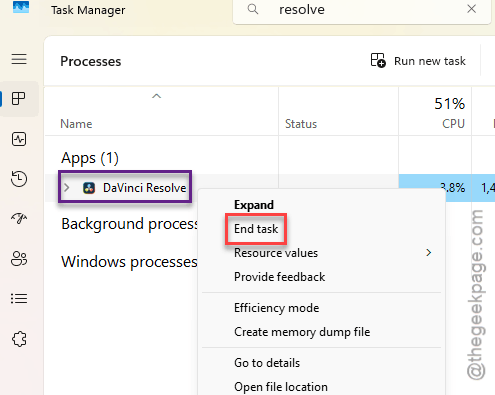
2 – Thereafter, find Resolve.exe in the list. Then, right-tap it, and click End task.
Do this for every such instances you see.
3 – Next, press Windows + R keys briefly to open the Run box.
4 – Paste this address, and press Enter.
%appdata%\Blackmagic Design\DaVinci Resolve\Preferences
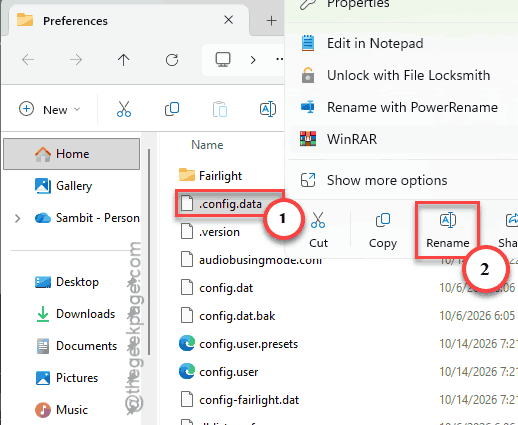
5 – Thereafter, look for the config.dat file.
6 – Once you have found it, right-click it, tap Rename.
Change the name to config.dat.old.
7 – Open DaVinci Resolve again.
See if this works for you.
Fix 2 – Make Windows Use Your Dedicated Graphics Card
If that didn’t work, you should
1 – Load up Windows Settings using Win+I buttons together.
2 – Thereafter, tap the System in the left sidebar, then Display.
3 – Scroll down and click Graphics.

4 – Under Add an app, leave the dropdown on Desktop app and click Browse.
5 – Go to C:\Program Files\Blackmagic Design\DaVinci Resolve, select Resolve.exe, and click Add.
6 – Find DaVinci Resolve in the app list and click it, then click Options.
7 – Choose High performance and click Save.
The setting takes effect the next time you open Resolve. No restart needed.
Fix 3 – Turn Off the Integrated GPU in Device Manager
Working on a laptop? Pull out the plug off the integrated GPU.
1 – Begin by right-tapping the Start button and click Device Manager.
2 – Then, double-tap the Display adapters to expand it.
3 – Look for two entries, like Intel UHD Graphics or AMD Radeon Graphics next to your NVIDIA or AMD card. The first one is the integrated chip.
4 – Right-click the integrated chip and choose Disable device. Do not choose Uninstall.
5 – Click Yes to confirm, then open Resolve.
Your screen may flicker for a second when you disable it. On some laptops the built-in screen is wired through the integrated chip, so if the display goes dim or the resolution drops, go back and pick Enable device on the same entry.
Fix 4 – Turn Off Hardware-Accelerated GPU Scheduling
Try disabling HAGS.
1 – Press Windows + I
2 – Now, follow this path –
System > Display > Graphics
3 – Proceed to the Default graphics settings.
4 – Later, toggle the Hardware-accelerated GPU scheduling toggle Off.
5 – Restart your PC.
See if this resolves your problem.
Fix 5 – Turn Off Hardware Decoding for H.264 and H.265
If that didn’t work, you should opt out of hardaware level decoding specifically for H.264 and H.265.
1 – Start by opening DaVinci Resolve. If it only freezes on one project, open a different one or create a new project.
2 – Then, tap the DaVinci Resolve in the top-left menu and choose Preferences.
3 – Go to the System tab at the top, then Decode Options on the left.
4 – While you are there, uncheck Decode H.264/H.265 using hardware acceleration.
5 – Click Save and restart Resolve.
Playback of those clips may get a bit heavier on your CPU. That’s the trade-off.
Fix 6 – Downscale Fusion Compositions
Heavy Fusion effects (Resolve’s built-in visual effects page) render at full resolution by default, which eats video memory fast.
1 – Open your project,
2 – Then, tap the gear-shaped icon in the bottom-right corner to load Project Settings.
3 – Afterwards, proceed to the Fusion section.
4 – Finally, you can turn on Downscale to Timeline Resolution for Timeline Clip Compositions.
5 – To apply thos change, tap Save.
That keeps a 4K Fusion clip from chewing through memory on a 1080p timeline.
People Also Ask
Does deleting config.dat delete my DaVinci Resolve projects?
The config.dat file that you have on your system file is unrelated to your DR projects. Actually, it is just a configuration file that upkeeps your modifications that you have put in place.