Do your contacts are getting synced automatically on the Facebook app? Facebook app does synchronize all of your contacts and help you find new friends based on your phone book. We have discussed why you should stop Facebook from accessing your contacts, and the actual way to do that.
Why you stop Facebook from syncing your contacts?
You may wonder why the Facebook app needs your contacts. It does analyze your phone book and present you with the list of contacts that you can send friend requests to and befriend them. While this feature is good when you are new to the Facebook and you don’t have many friends, it is not equally useful later. As you spend more time on Facebook and your friend list grows up, you don’t need the Facebook app going through your contacts and making new suggestions.
This is the point where you should revoke the Contacts’ permission from the Facebook app. In that case, we recommend you follow these steps in the Accounts Center on the Facebook app and take control of this setting.
Fix 1 – Disable Contacts Upload from Accounts Center
You can do this directly from the Facebook app.
Step 1 – Open the Facebook app.
Step 2 – Touch the profile or three-bar button icon on the bottom dock.
Step 3 – Next, tap the “Settings & Privacy” drop-down option. Choose the “Settings” option in there.

Step 4 – Tap the “Accounts Center” portion on the screen.
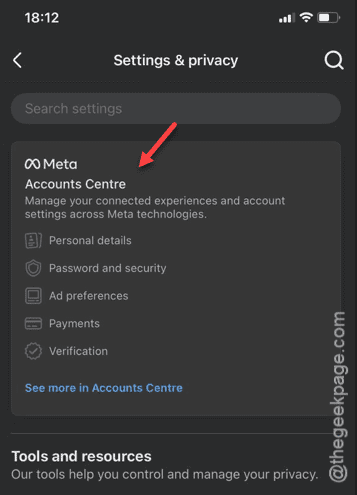
Step 5 – When the Accounts Center overlay appears, tap the “Your information and permissions” option.
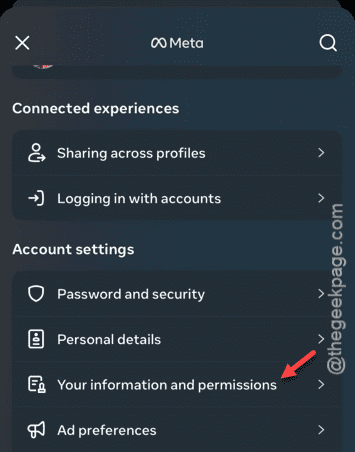
Step 6 – On the next page, tap the “Upload contacts” option.
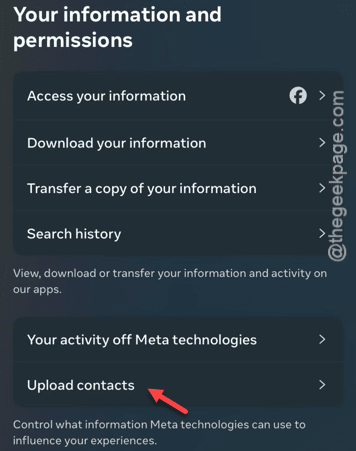
Now, you shall see all of your Meta accounts that you have logged in on the app or the iPhone.
Step 7 – We are only interested with your Facebook account. Tap the Facebook account that you are currently using.
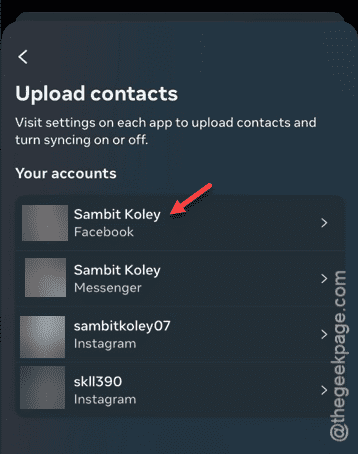
Step 8 – Now, just turn off the “Upload Contacts” option.
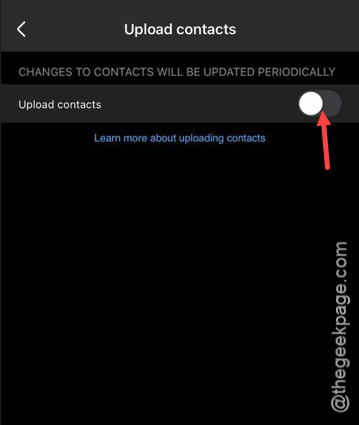
Step 9 – A warning message might appear. Ignore that and tap “Turn off“.
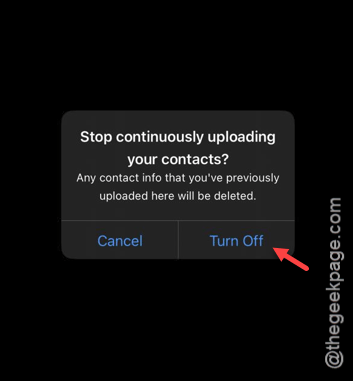
Once you have turned it off, Facebook won’t be uploading any of your contacts from your iPhone.
Fix 2 – Revoke Contacts permission from Settings
There is another alternative approach that you can use. You can do this directly from the Facebook settings.
Step 1 – Open up the Settings screen.
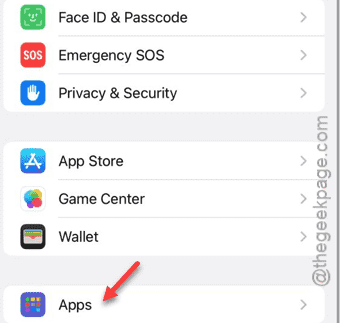
Step 2 – Go to “Apps“.
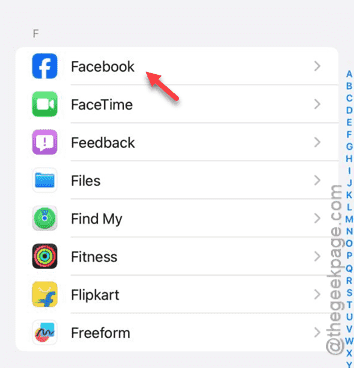
Step 3 – In the Apps page, open up the “Facebook” app.
Step 4 – Tap the “Contacts” option in there.
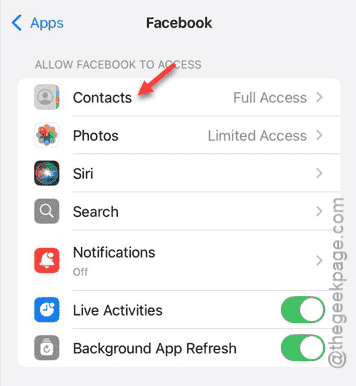
Step 5 – Choose the “None” from the list.
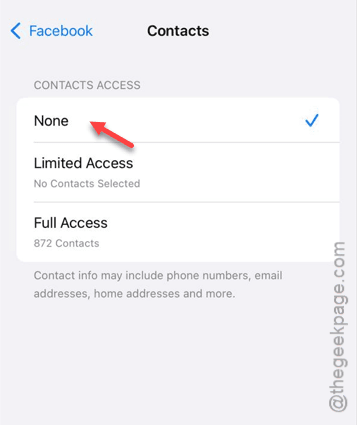
This is enough to revoke the contacts’ permission from the Facebook app.
You can now enjoy Facebook without getting bombarded with friends suggestions sourced directly from your own contact list.
Hope this have helped you!