Apple Watch users worst nightmare is having the wearable stuck in a boot loop. If the Apple Watch is just showing up the Apple logo at the startup and turning off after a few seconds, and then restarting and doing the same thing in a cycle, consider it to be stuck in a boot loop. If your Apple Watch is exhibiting the same behaviour, don’t worry. There are a few steps you can do to restore it back to normal in no time at all.
Preliminary Workarounds –
1. Using two fingers, gently tap the Apple Watch screen and the back for a few times. Force-restart the Apple Watch and check.
2. Spam the side button for a few times. Then, put the Apple Watch on charger and try to force-restart it.
Fix 1 – Restore the Apple Watch in Recovery Mode
The main objective of this process is to put your Apple Watch in Recovery Mode, and restore it back to normal.
Step 1 – Place the Apple Watch on charge.
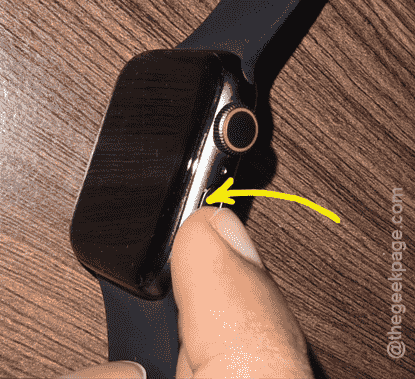
Step 2 – Now, press and hold the digital crown and the side button. Do this until you can see ❗ with Apple Support URL (support.apple.com/watch/restore).
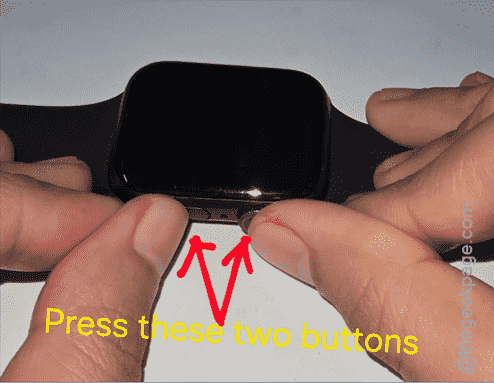
Step 3 – After this, hold down just the side button for 20 seconds or so, or until the Erase All Settings option shows up.
Step 4 – Use that option to reset the Apple Watch.
Even if this resets the Apple Watch back to the factory default, it will pull it out of the death loop problem.
Fix 2 – Force Reboot the Apple Watch
The quickest workaround to this problem is to force-restart the Apple Watch.
Step 1 – At first, hold the side button and digital crown on your Apple Watch together for 10–15 seconds.
Step 2 – Do continue pressing those buttons until the Apple Watch logo flashes up on the screen.
Step 3 – Wait for a few seconds to check whether the Apple Watch dies or not.
Step 4 – If the Apple Watch dies again, do the force-restart procedure again for a few times.
Check if this solves your issue!
Fix 3 – Contact Apple Support citing hardware malfunction
If your Apple Watch is still stuck in the boot loop and all the previously mentioned fixes have failed, it is time for you to directly consult with an authorized Apple Service Centre. Book an appointment with the Apple Watch Service Center. Get the device examined by them, and they will guide with further steps for resolution.
Additional Fix – Freezer Method~
Some of the Apple Watch users have found out a weird and assured fix for this issue. It seems this boot loop issue can be fixed simply by placing the Apple Watch in the freezer for a while! While this method does not focus on the software-centric solution, it has helped quite a lot of the affected lot, so it’s worth mentioning.
Step 1 – Pull out the strap from your Apple Watch. Remove any protective part from the main Apple Watch dial.
Step 2 – Now, place the watch in the freezer for ten to fifteen minutes.
Step 3 – After 15 minutes has passed, get it out of the freezer.
Step 4 – Finally, hold down the Side button and Power button for 10 seconds to boot up the Apple Watch.
Step 5 – If the Apple Watch dies again and gets stuck in the boot loop, repeat the Step 4 again and again up to 5 times.
This method has worked out for many users.
FAQs –
What is the exclamation mark on the Apple Watch?
The exclamation sign on the Apple Watch display indicates something is wrong with the device, and you must restore or update the device to continue. Place the device to charge with near an updated iPhone (with the Bluetooth, Wi-Fi enabled). Double-tap the side button once and continue with the restore or update process.
Why does my Apple Watch is stuck in Boot Loop?
Boot loop, where the Apple Watch restarts and dies automatically, can be due to a temporary bug in the watchOS or due to hardware malfunction, like wore out battery. However, exposure to extreme heat or cold for older Apple Watch Series can cause the device to get stuck in a boot loop. Try force-restarting the Apple Watch once, otherwise try to erase or update the device.