Does the Apple Watch screen swell up? This is a serious problem that you must not ignore any further. If the Apple Watch looks puffy, it is not a software issue but possibly a serious hardware problem. It is usually caused by a swollen lithium-ion battery on the Apple Watch. This is considered a safety hazard and must be dealt with with immediate caution. Here are the detailed instructions that you must perform as soon as you see signs of a swollen screen on the Apple Watch.
STEP 1 – Immediate Power Down
The most important step in this procedure is to stop the battery from being active. Switch off the Apple Watch as soon as possible.
Step 1 – At first, press and hold the Side button of the Apple Watch.
Step 2 – Then, tap the power icon there and, later, use the slider to power off the wearable.
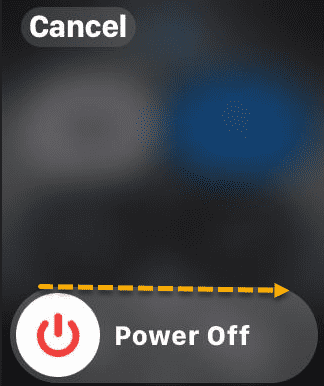
Do not turn the Apple Watch back on.
STEP 2 – Disconnect from Power Source
Do not try to charge the Apple Watch if the signs of a swollen battery show up on the wearable.
Step 1 – Remove the Apple Watch from the charging pack immediately.
Step 2 – Unplug the charger from the wall.
If you have noticed the swelling behavior while the device is charging, you may use a non-flammable substance to nudge it off the charging puck.
STEP 3 – Do not Press the Screen Down
You can’t just press the screen down to the Apple Watch base.
Step 1 – Do not try to press the swollen screen back to the watch base.
Step 2 – If the Apple Watch screen is hanging just by a ribbon cable, do not pull it.
Step 3 – Wrap a rubber band around your watch just to keep the glass from falling off.
STEP 4 – Check for out-of-Warranty Battery Service
According to the Apple communities, you should consult with the Apple Service in case of the swollen battery incidents, even if the Apple Watch is out of warranty/
Step 1 – Find the serial number on the back side of the Apple Watch. Or, you can find it in the Watch app on your iPhone.
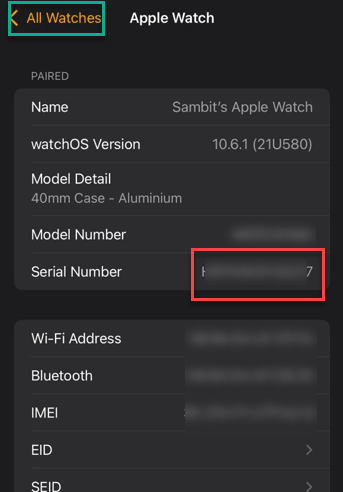
Step 2 – Contact Apple Support via chat or call.
Step 3 – Use “battery swelling” or “expanded battery” phrase during the support.
You may get the Apple Watch replaced for free or a discounted replacement.
STEP 5 – Store the Apple Watch in a Secure Box
Until you are taking the Apple Watch to a service center, you must stored it in a container where it won’t cause damage if things become even worse.
Step 1 – Place the Appe Watch in a metal or glass box with a lid.
Step 2 – Keep the container away from flammable materials.
Step 3 – Do not store it in a freezer.
If you notice smoke or a metallic odor, do not touch the device. Use a fire extinguisher for eletrical or chemical fires to extinguish the flames.