Does your Apple Watch keep on switching to silent mode automatically? Don’t worry. There is absolutely nothing wrong with your Apple Watch and everything is just working fine. There is a feature of the watch that is responsible for this behavior. You can follow these steps and do the troubleshooting on your own.
Why the Apple Watch keeps switching to silent mode?
The reason why your Apple Watch keeps going into the silent mode is because of a gesture on the device. The gesture that is responsible for this behavior on the watch is known as ‘Cover to mute’. It is very useful in certain situations where you can just mute an incoming call or alert instantly just by covering the watch screen, without you have to interact with the watch.
This feature can become a quick point of annoyance if you are not used to it. Like, you don’t want your watch to keep going to silent mode if you have mistakenly covered the watch surface. So, we have the particular fix for you that should be enough to take care of this problem.
Fix – Disable the ‘Cover to Mute’ feature
You have to disable this ‘Cover to Mute’ gesture on your watch to fix this problem.
Step 1 – At first, press the crown on your watch.
Step 2 – This should take you to the apps list on your device.
Step 3 – Then, go to the “⚙” button to load the Watch Settings.
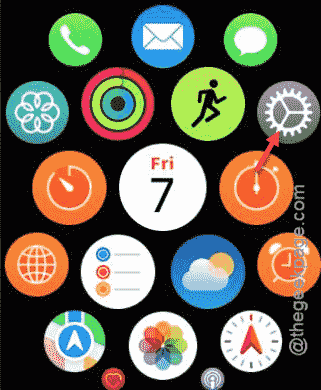
Step 4 – After it loads up the Settings page, find the “Gestures” option there. Open it up.
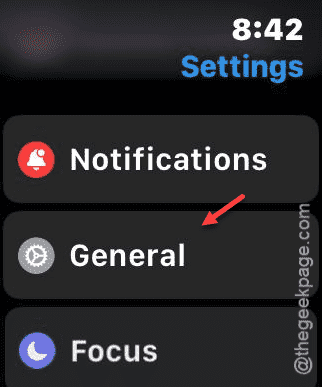
Step 5 – You have to find the “Cover to Mute” feature there. Once you have found it, turn it off.
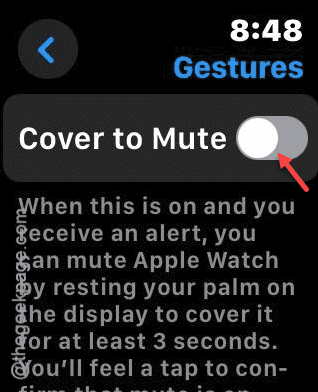
That’s it! It is that much simpler to fix this problem where the Apple Watch seem to be getting silenced automatically.
NOTE – This problem can be directly linked to the gesture on the device. But, there are other scenarios where you may face this issue. Like, if your watch is in Silent Mode, or you have put it in Theater mode, the alerts will get silenced. So, you should check the Control Center in that case.