Does the Apple Watch not speaking time aloud with two fingers? This is an obvious problem for any Apple Watch user who are used with the usual time call out feature. If you are having some problem with this double finger time speaking facility, you can go through this guide to fix it yourself.
Why the Apple Watch is not speaking time with two finger tap?
There is this feature on the Apple Watch where the watch speaks the time aloud whenever you tap the screen with two fingers. It is an excellent feature in many situations where you can’t lay your eyes on the watch to know the exact time. Just placing two fingers on the watch surface and having the time read aloud is an ease of access feature that every watch users enjoy.
This feature stops working in certain situations. The watch actually stops calling out the time allowed if the device is in silent mode. But, there is a nice little trick where you can just make the watch ignore the silent mode and read the time to you.
Fix 1 – Disable the Silent mode
The first basic troubleshooting step is just to turn off the silent mode on the watch.
Step 1 – Press the side button on the watch gently.
Step 2 – When this loads up the Control Center, disable the “Silent Mode“.
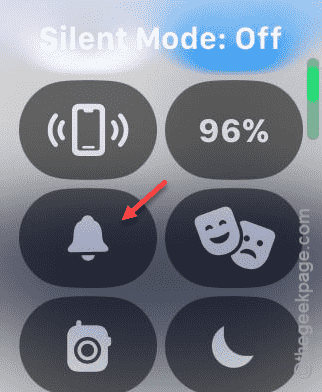
After disabling the silent mode, tap the watch face using your two fingers, and it should speak out the time properly.
Fix 2 – Enable the Speak Time feature
The ‘Speak Time’ facility is controlled in the silent mode on your Apple Watch. It silences the time callouts while the device is in silent mode.
Step 1 – You have to tap the crown of the Apple Watch once.
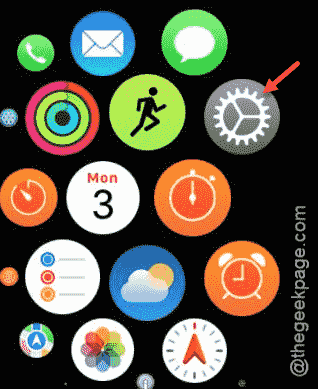
Step 2 – When this loads up the app list, go to the “Settings” tab.
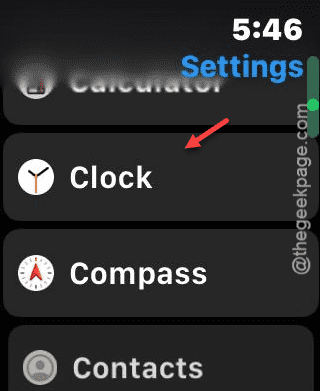
Step 3 – Scroll down and open up the “Clock” feature.
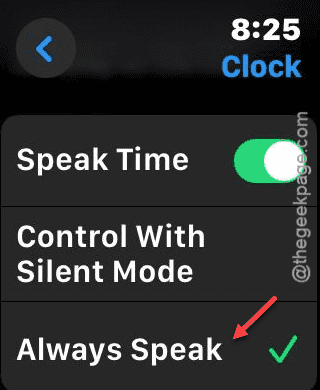
Step 4 – Thereafter, you have to scroll down again. Now, enable the “Speak Time” feature.

Step 5 – While it is enabled, put it in the “Always Speak” mode.
This should fix the problem with the time speak issue that you are having on your Apple Watch.