Does your Blood Oxygen not working or measuring the data correctly on your Apple Watch? Apple Watch users, mainly the latest version of the Apple Watch Ultra 2 users, have faced issues with the Blood Oxygen measurement feature. Actually, Apple had to disable the Blood Oxygen measurement system on some of the Apple Watches due to legal issues, but there are some other simple reasons as well. Whatever is the probable reason behind this issue, proper resolutions should help you track the Blood Oxygen metrics easily again.
Apple’s Recent Update on Blood Oxygen in US Region –
Apple has recently released a circular for their U.S. users where the Blood Oxygen feature is disabled for the time being. If your Apple Watch model ends with LW/A, or you have an Apple Watch Series 9, Series 10 and Apple Watch Ultra 2 users can’t view the Blood Oxygen level directly from the watch screen. Instead, you can see the measurements directly on the paired iPhone. But, your iPhone needs to be updated to iOS 18.6.1 or later, and the Apple Watch to watchOS 11.6.1.
Fix 1 – Update the iPhone and watchOS
If you are using Apple Watch Series 9, 10 or Watch Ultra 2, direct measurement of Blood Oxygen from the watch is not possible, yet. Instead, you will get the same information on the iPhone.
Step 1 – Launch the iPhone Settings and go to the General settings.
Step 2 – Next, load up the Software Update settings.
Step 3 – If an iOS update is pending, tap the Update Now.
It will download and update the iOS on your iPhone.
Step 4 – Now, go ahead and load up Watch app.
Step 5 – In the My Watch section, load up the General section. Later, go to the Software Update section.
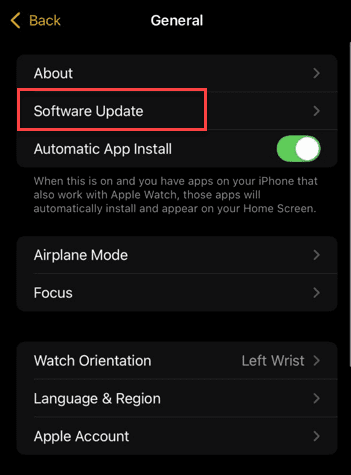
Step 6 – Download and install the latest version of the watchOS on your system.
After updating both the devices, you can see the Blood Oxygen measurements following this way –
1. Open the Health app on your iPhone.
2. Reach the Respiratory section, and you can track the Blood Oxygen level and the past readings from there.
Fix 2 – Run the ECG App and Then Record Blood Oxygen
It seems that Blood Oxygen feature may not get activated if the ECG App has not started yet.
Step 1 – Tap the crown button once on the Apple Watch to view the apps list on the device.
Step 2 – Next, find the ECG App and open it.
Step 3 – Hold your finger on the crown for 30 sec to get a proper ECG graphical reading.
Step 4 – After you have run the ECG App, launch the Blood Oxygen app on the watch.
This time, you will get proper Blood Oxygen readings.
Fix 3 – Change the Apple Watch Position on your Wrist
Slightly changing the Apple Watch position on your wrist should fix the issue with the Blood Oxygen measurement problem.
Step 1 – Adjust the Apple Watch on your wrist correctly. Do not place the Apple Watch directly on the wrist bone, but slightly under that bone, so that it comes into the contact of muscle.
Step 2 – Tighten the Apple Watch strap correctly so that it has proper contact with your wrist.
Now, run the Blood Oxygen measurements on your Apple Watch.
FAQs –
1. Why can’t I see Blood Oxygen on my Apple Watch Ultra 2?
Apple had to partially restrict the Blood Oxygen function on the Apple Watch Series 9,10 and Ultra 2 model. While you can analyse your Blood Oxygen level directly from a paired iPhone, you can’t directly access the data from the Blood Oxygen app. However, starting the ECG app should help fix the Blood Oxygen from the Apple Watch.
2. Can I measure Blood Oxygen using my Apple Watch?
Yes. The Blood Oxygen level measurement function is available from the Apple Watch Series 6 and later. You can easily measure the Blood Oxygen from the Blood Oxygen app on the Apple Watch. Though the feature is partially restricted on the Apple Watch Series 9,10 and Ultra 2, it will be fixed in future updates.