Getting the ‘Apple Watch is fully charged’ notification on your Apple Watch? The robust and apt notification system is quite helpful for the users to track alerts without using their iPhone. The charging notifications that you are getting on your watch is a part of the watchOS native structure. It is usually useful, but if you want to get rid of it, you can very easily do that.
Why am I getting the watch is fully charged notification?
Apple Watch conveys important information via it’s notification system. It is not just limited to mail or social media alerts, but it also sends system notifications occasionally to the user. One of such alerts is the battery notification system that sends an alert whenever the watch is fully charged. The alert goes something like this ~ ‘Sambit’s Apple Watch is fully charged.‘ While this is useful for the majority of the users, the same alert system can be annoying for some people. Like, if you have plugged in the Apple Watch for charge in the night and expect it to get charged by the morning, this alert can actually wake you up from your sleep.
You will be glad to know that there is a very simple resolution for this. As the Apple Watch user, you should have the complete liberty to take control of this alert system directly from watch. You can’t disable charging notifications directly on your Apple Watch. Still, there is a way you can actually turn off the charging notifications, which you may do from the Sleep settings of the watch.
Solution ~ Turn off the Charging Reminders
You can turn off the charging reminders only from the Sleep settings of the watch. Here are the steps to follow to do that~
Step 1 – Load up the Watch app on your iPhone.
Step 2 – Now, go to the My Watch tab.
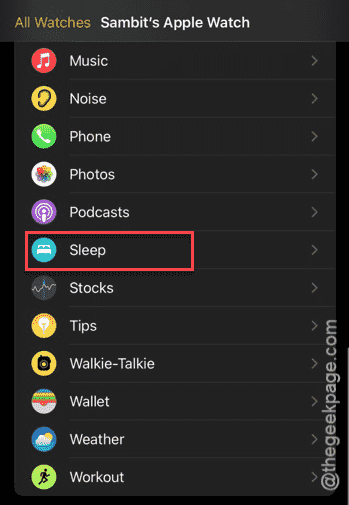
Step 3 – Then, scroll down to find the Sleep app settings there. Load it up from there.
Step 4 – Turn off the Charging Reminders from there.
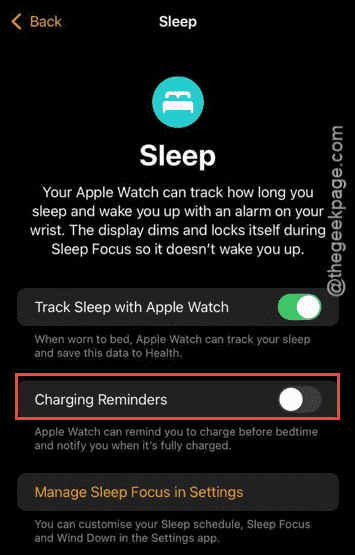
That’s it! You will no longer get the charging notifications on your Apple Watch. But, remember that this also subdues the important charging alerts to put the watch on charge that you usually get before you go to bed.
NOTE – The battery notification system is a critical for any device. So, Apple does not allow interfering with the usual charging notification system. The trick we have mentioned comes with its own disadvantages as well. We recommend you turn on the charging reminders later.