Getting inaccurate heart rate readings on your Apple Watch? Millions of Apple Watch users use their Apple Watch to track their vital health information, such as heart rate. So, if the heart rate readings are somehow coming out wrong, it can even be fatal during a sudden medical emergency. So, if your Apple Watch is giving out false readings, you should not neglect it any further. Here are some troubleshooting steps you may follow to fix this problem.
Fix 1 – Ensure Correct Fit on Wrist
In most of the cases, a loose fit of Apple Watch is responsible for such false readings from the wearable. Actually, the Apple Watch needs a good, strong fit on the wrist, for the sensors on the back of the watch to sense the user’s biometric data properly.
Step 1 – Wear the Apple Watch on your wrist properly.
Step 2 – Make sure it is a snug fit, not a loose one.
Then, go ahead and check the heart rate reading again. If the watch is giving away any other false biometric reading, do check that as well.
Fix 2 – Clear up the Sensor region
If the sensor glass region has accumulated a thin layer of dirt or any other substances on the watch back side.
Step 1 – Turn off the Apple Watch. Press and hold the watch side button on the Apple Watch for a few seconds.
Step 2 – Tap the power icon once.
Step 3 – Then, slide the Power off slider across to power off the watch.
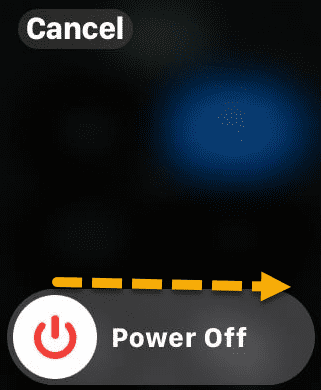
Step 3 – Now, take a lint-free soft cloth and clean the watch’s back surface, which rests on your wrist. Remove any kind of sweat, dust, sunscreen and moisture from the device.
Step 4 – Leave the Apple Watch alone for a few minutes.
Then, try to measure your heart rate using the Apple Watch. Compare the values of it with your dedicated fitness band.
Fix 3 – Force Restart the Apple Watch
The force-restart procedure can commit any possible bug or glitch in the device and fix the issue on the Apple Watch.
Step 1 – To do this, start to press and hold the digital crown and side button on the Apple Watch.
Step 2 – Do press-hold those buttons like that for 8–10 seconds, or until the Apple logo appears on the watch screen.
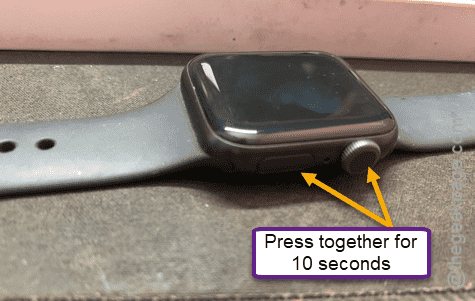
Once the watch restarts, use the ECG app to track the heart rate again.
Fix 4 – Reset the Fitness Calibration Settings in Apple Watch
Resetting the Fitness calibration should adjust the sensors to their default setting.
Step 1 – Open up the Watch app on your Apple Watch.
Step 2 – Next, go to the Privacy section.
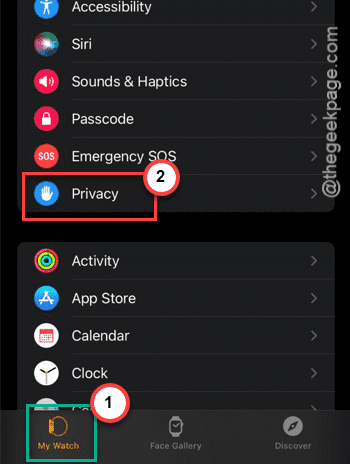
Step 3 – Then, tap the Reset Fitness Calibration Data.
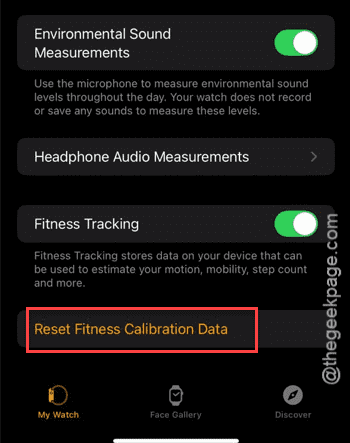
This will delete all the fitness calibration data accumulated by the watch, setting all the sensors to their default values.
Fix 5 – Test your heart rate with medical equipments
The spike in the heart rate for a few times can be ignored. Our heart rate does also increase rapidly during work-outs or other physical activities. Intensive or unusual arm movements can also lead to such sudden spikes in the heart rate.
But, a consistent high heart rate readings should not be ignored. It can be a sign of a medical issue, so you should immediately consult a doctor.