Focus Modes on the iPhone or iPad can be very useful to keep the distractions aside, helping you focus on the productive part of your work. But, for the early adopters of this feature, it can be a bit of challenging for the users to learn and use Focus Modes perfectly. So, we have constructed this guide on Focus Modes and how to disable the Focus Modes on the iPhone.
Why my iPhone is in Focus Mode?
Focus Modes can be scheduled to be turned on automatically. In that case, your iPhone will into the specified Focus Mode whenever it is time. This is one of its features, not a problem. But, if the particular focus mode is not configured correctly, Focus Mode will get activated at your hindsight. Starting from missing an important call to event alerts, you will miss everything.
So, it is important that you know whether your iPhone is in Focus Mode and even if that is the case, which of the focus mode the device is using. Here are steps that you can follow to disable the Focus Mode or edit the schedule of such focus modes.
Fix – 1 Disable the Focus Mode from Control Center
Getting out of the Focus Mode doesn’t take much of effort.
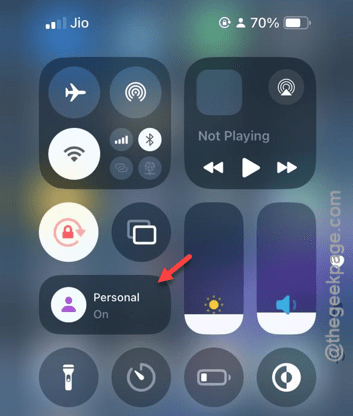
Step 1 – Just toggle down the Control Center on your iPhone.
Step 2 – You can see the Focus Mode there. The current Focus Mode should be clearly visible there.
Step 3 – Hold that down for a few seconds.
Step 4 – You shall see the list of Focus Modes available on your iPhone.
Step 5 – Simply, tap the focus mode there to disable it.
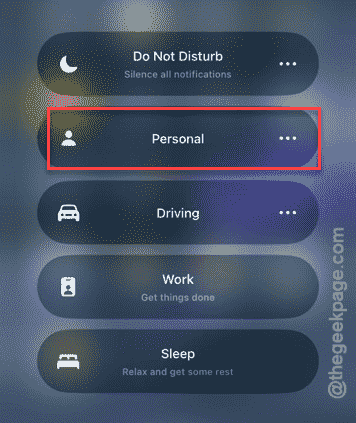
Once you have disabled the focus mode, you can check out the iPhone.
Fix 2 – Modify or delete the Focus Mode
You can tweak the schedule of the Focus Mode or remove any focus mode that you don’t want on your iPhone.
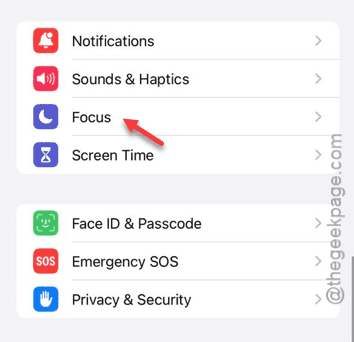
Step 1 – Go to the Settings.
Step 2 – Next, go straight to the “Focus” settings.
Step 3 – In the Focus Mode settings, choose the one that is getting activated on its own.
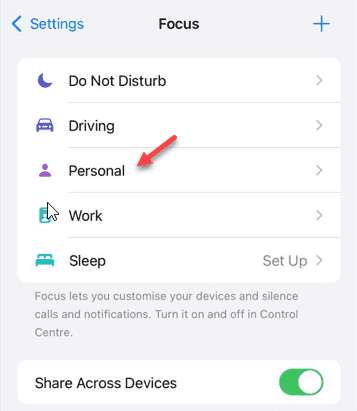
Step 4 – Next, you have to change the schedule of that particular focus mode. You can view the current schedule in there and tap the same schedule to edit it.
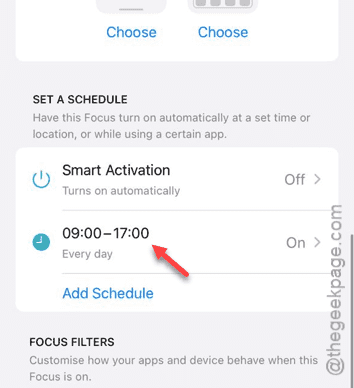
Step 5 – Change the schedule according to your own preference.
Step 6 – Tap “Done” to save it.
Now, these are the steps that you can follow to tweak the focus modes. But if you have a customized focus mode, you can delete that particular mode from your iPhone.
Step 1 – Open up a iPhone Settings and go to “Focus“.
Step 2 – Thereafter, open up the focus mode.
Simply, scroll down and use the “Delete Focus” option to remove the particular focus mode from your iPhone.
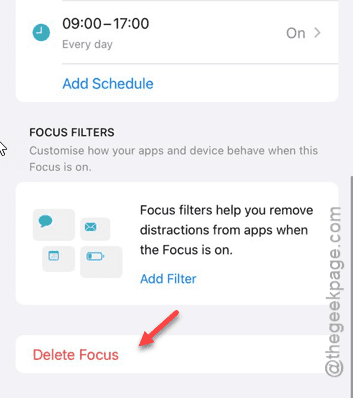
Now, your iPhone won’t get into the specified focus mode again.