Is your iPhone stuck in Dark mode? There are some users that have experienced this bug where the device seems to be stuck in the dark mode. While there are many users who prefer to use the device in dark mode, most of us prefer to switch between light and dark modes. This problem seems to limit the choice of changing different modes at our will. So, you must solve this problem at your end.
Fix 1 – Force restart the iPhone
Force restarting the iPhone is the first solution that you should implement. Force-restarting should get the device out of the dark mode.
Step 1 – You should close all the apps that you have opened recently.
Step 2 – Next, tap the Volume Up button on your iPhone.
Step 3 – Just press and release the Volume Down button as well.
Step 4 – Then, press the Power button until the iPhone restarts.
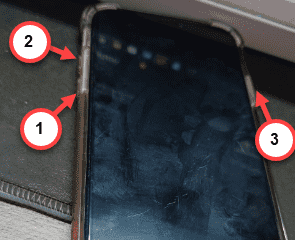
When the iPhone force restarts, it may not come out of the dark mode straightway. If that is the case, you can just toggle to the Light mode from the Control Center.
Fix 2 – Reset the entire iPhone’s settings
A bug can be held responsible for this issue. So, you should reset all the iPhone’s settings.
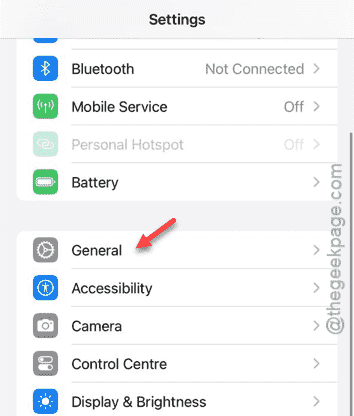
Step 1 – To do this, you should open the Settings page, first.
Step 2 – On the iPhone Settings page, go to the “General” settings.
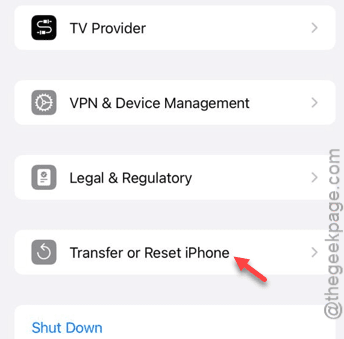
Step 3 – Later, tap the “Transfer or reset iPhone” settings.
Step 4 – Next, tap the “Reset” option there.
Step 5 – Choose the “Reset All Settings” option, which is the first option in the list.
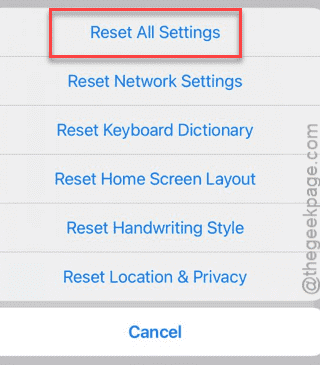
After the verification step, your iPhone will restart automatically. This won’t affect any of the app data or delete any of the apps or files on your phone. Just resets the settings to the factory settings.
So, after it resets, check the status of the dark mode issue on the iPhone. Try to switch to the light mode.
Fix 3 – Update the iPhone’s OS
If the iPhone lacks any important iOS update, you should update it.
Step 1 – Go to the Settings.
Step 2 – Then, reach the “General” settings.
Step 3 – Once you have reached there, tap the “Software Update” panel.
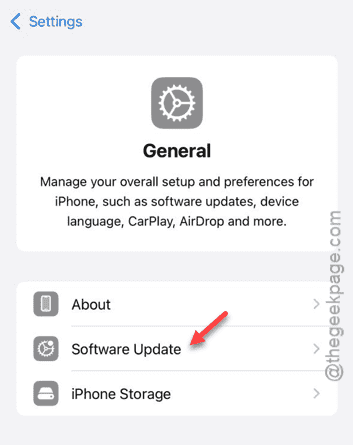
Step 4 – Wait for a few seconds to see whether any update is actually pending or not. Then, tap “Update Now” to install the update right away.
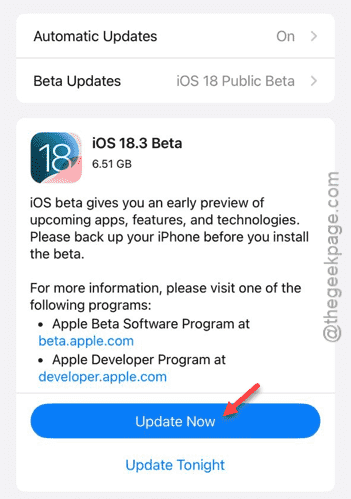
After installing the updates, the ‘dark mode’ problem will disappear.