Seeing Call History on the iPhone used to be a humongous task before the introduction of iOS 18. Though you can view all of your recent calls in the Recent column, those call logs rolls away as you continue to make more calls from the device. So, if you can’t track the Call history on your iPhone, here is the guide that will help you out.
NOTE – The list that you see in the Recent tab is the call history for your iPhone. If you have an older iPhone (iOS 16/17 or before), this entire call list is capped to the 100 recent calls. This is an iOS-based restriction, and the only thing you can do is to update the iOS to the latest version.
Fix – 1 Opt for the ‘All’ tab
You might be seeing the ‘Missed’ tab in the Phone app.
Step 1 – Open up the Phone app.
Step 2 – In the Phone app, go to the “All” tab.
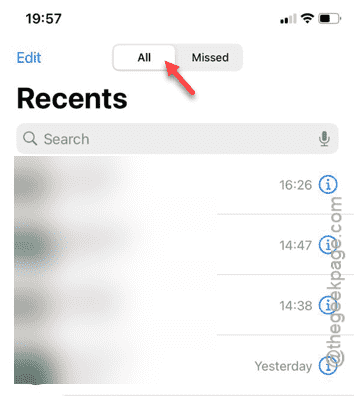
There you can view all the phone calls there.
Fix 2 – Restart the device
If this is just a bug or glitch in the device, restarting it may help. Basically, rebooting the iPhone should be useful in this case. Once the device reboots, go to the Phone app and see whether you can track the call history or not.
Fix 3 – Change the region
If you are currently located in a different region other than the preset region, you should change it.
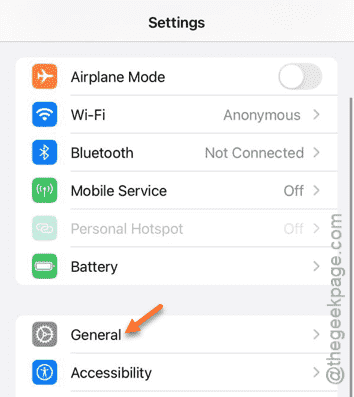
Step 1 – In the iPhone Settings page, go to the “General” tab.
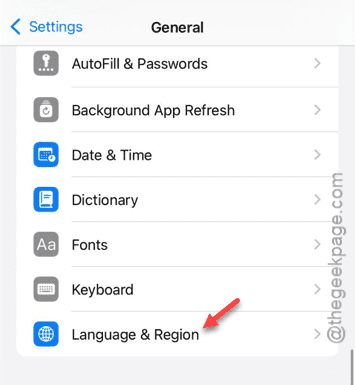
Step 2 – After this, scroll down and load up the “Language & Region” category.
Step 3 – Open the “Region” tab, next.
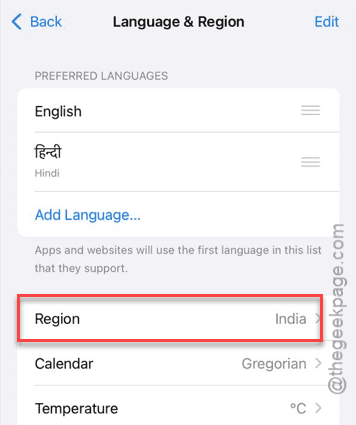
Step 4 – Now, you must select the region where you are in to set the region.
Step 5 – When the iPhone ask for confirmation, tap “Change to <region>” option.
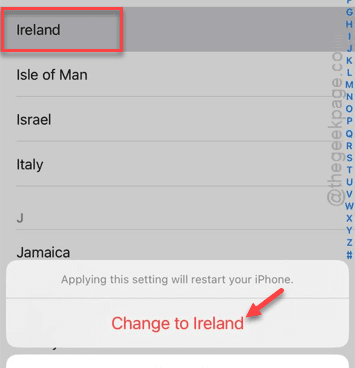
Your iPhone will restart automatically, and the region will be changed. After changing the region, you can see all the past calls in the Phone app.
Fix 4 – Ask your operator
You can ask the mobile operator to get access to the call list.
Step 1 – Perform a Google search for the call history link using the carrier service name. Example – If you are on AT&T service, search “att call history“.
Step 2 – Then, look for the official link to download the call history directly. Tap that.
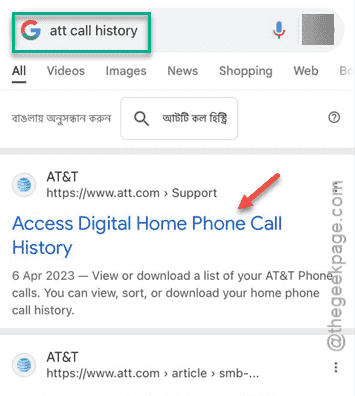
The rest of the procedure is very simple. You have to log in to your account using your own credentials.
You can view the call history by logging into your account. These call logs will be delivered to you via a secured email.