Can’t download apps from App Store on cellular data? You don’t need to be connected to the Wi-Fi while downloading apps from the App Store. You should not face any problem getting the apps while using mobile data. But, there are some limitations placed on the size of the apps that you can download while on the mobile data. We have discussed all of these in details and instructions to revoke the limiter placed.
Why I can’t download apps on cellular data?
Most of the users stumble upon this problem while downloading big games or application of considerable size while using the mobile data. iPhone allows up to 200MB sized apps while using the cellular data. Whenever you try to download apps more than 200MB, the downloading process won’t even begin in the App Store.
Cellular data packs are costlier than broadband/satellite connections. This is placed on the iOS to protect the users from spending unnecessary cellular data while downloading big apps or games. But, if you want to download an app bigger than 200MB in size on mobile data, you have to execute these steps.
Fix – Revoke the limit on mobile data
You can manage the entire the functionality of the App Store in mobile data from the App Store settings. So, without wasting any time, follow these steps.
Step 1 – Go to your Settings tab.
Step 2 – Scroll down and open up the “App Store” function.
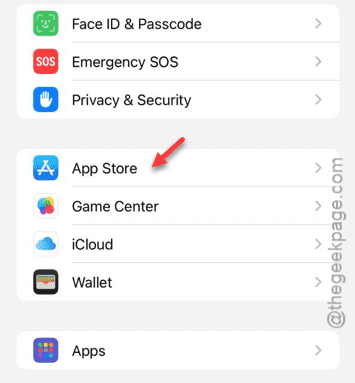
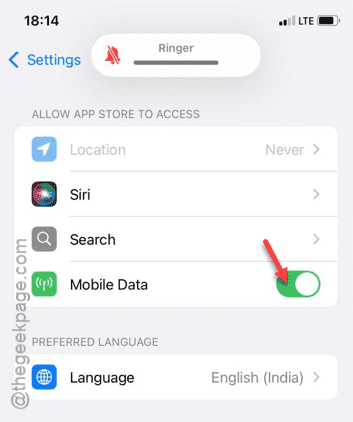
Step 3 – After opening the App Store window, enable the “Mobile data” (or “Cellular Data“) there.
If this is enabled, you can operate and download apps from the App Store app.
Step 4 – Next, slide down further to ‘Mobile Data’ area. Enable the “Automatic Downloads” function. The apps from the App Store will be
Step 5 – Next, open up the “App Downloads” menu.
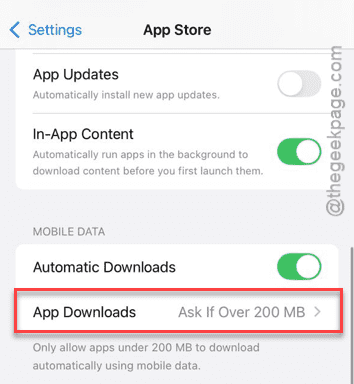
Step 6 – There are two options that you can select. Either, choose the “Always Ask” or “Always Allow” option.
If you choose the ‘Always Allow’ mode, there will be no restriction on mobile data usage by the App Store. You can download any app or game irrespective of it’s size.
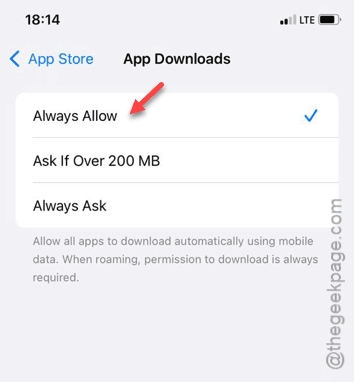
The other option, ‘Always ask’ is what we recommend you choose. While you have selected this feature, App Store show you a message stating the size of the app. If you want to download that app, you can do that using the ‘Download‘ button available there.
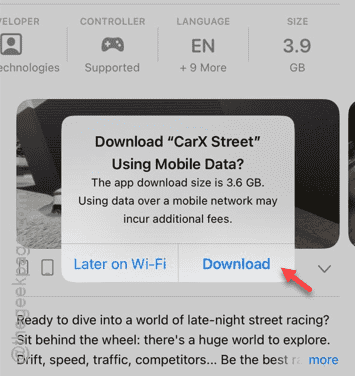
This way, you can get the apps from the App Store on mobile data, irrespective of the network that you are using.
Check if this helps!