Missing some of the apps after updating to iOS 26 on your iPhone? Some of the iPhone users have recently complained of this weird issue where they are unable to find some of the apps after completion of the iOS 26 update. If the same thing has happened to you, and you are wondering about those missing apps, here is a detailed guide on this issue, alongside the perfect countermeasures that you can apply to fix this issue.
Fix 1 – Increase the Age Rating Restrictions
There are certain apps that may not appear on the iPhone after the iPhone update due to the certain level of age restrictions imposed on the device. You have to increase the age restriction to 16 to use the apps.
Step 1 – To do this, launch iPhone Settings on your device.
Step 2 – Then, go to the Screen Time settings.
Step 3 – Next, load up the Content & Privacy Restrictions module. Tap the App Store, Media, Web & Games settings.
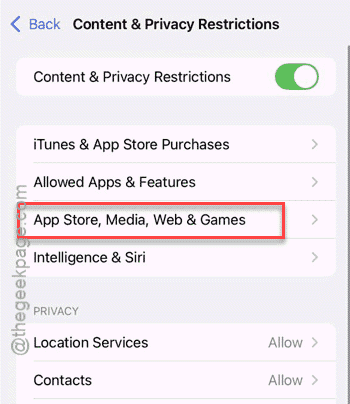
Step 4 – Finally, open up the Apps settings.
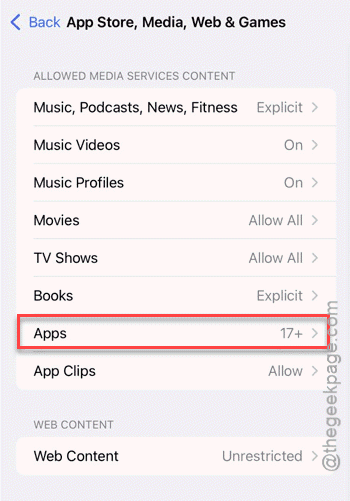
Step 5 – Set it to 16+ or 17+ or any age rating according to your preference from the list of available ratings.
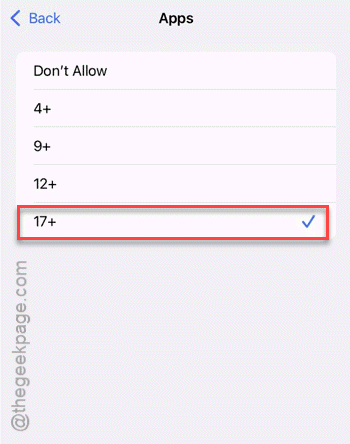
After modifying the age ratings settings on the device, the apps will be available on your iPhone.
Fix 2 – Reset All your iPhone’s Settings
If the issue has originated due to a restriction setting, resetting all the settings to default mode should fix the problem.
Step 1 – At first, load up the iPhone Settings.
Step 2 – Go forward this way –
General -> Transfer or Reset iPhone
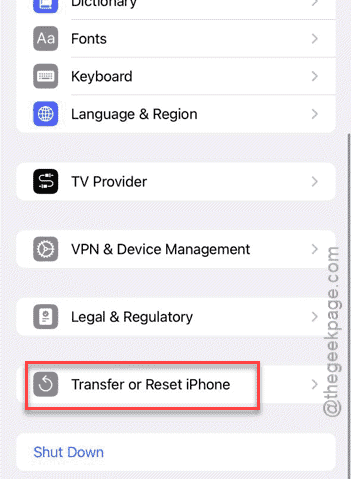
Step 3 – Then, go to the Reset option. Finally, choose the Reset All Settings option in the list to reset all the iPhone’s Settings.
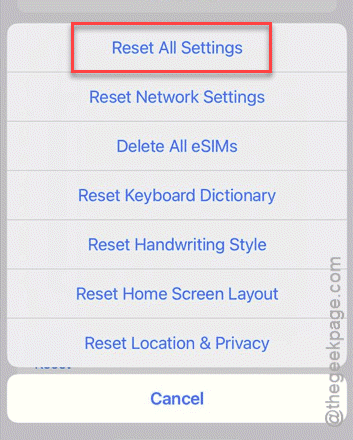
Step 4 – Keep in mind that this process will require you to use the iPhone passcode to complete this.
After your iPhone restarts, there won’t be any age restrictions imposed on the apps on your iPhone.
Fix 3 – Force Restart the iPhone
If your iPhone does not have any such restrictions placed on it, you should force-restart the device to resolve this.
Step 1 – The process of force-restarting the iPhone is quite simple. Press the Volume Up key once and release it.
Step 2 – Next, do the same with the Volume Down button.
Step 3 – Then, finally, press-hold the Power button until the iPhone completely restarts.
After the iPhone restarts, check the status of those missing apps.
Why the apps have disappeared from the iPhone after updating to iOS 26?
The reason behind this sudden disappearance of apps can be linked to the restrictions placed on the iPhone. This is the common cause for missing apps on iPhones, if the Age Rating Restrictions imposed on the device. Certain apps like Reddit, Tumblr comes with the updated age rating of at least 16+ category. So, if the app and content restrictions is applied to Age Rating 12 or so in the iOS 18, those apps will get offloaded automatically during the update. The critical solution for this problem is to adjust the Age Rating from the Privacy restrictions page on the iPhone Settings. However, if the Screen Time settings on your iPhone is managed by your parent’s device, you have to ask them to do this for you.
FAQs on apps disappearing from iPhone after iOS 26 update –
1. Why can’t I find some of the apps after installing the iOS 26 update?
Apples stringent age restriction policy can remove unqualified apps automatically from your device. The particular app’s age rating like, Tumblr has 18+ rating, may not be available on a restricted device. After updating to iOS 26, you must change the Age Restriction level from the Apps settings in Content & Privacy settings inside the Screen Time settings.
2. Can iOS 26 update delete any data from my iPhone?
No. iOS 26 or any other iOS updates never removes anything from your iPhone. However, Apple Support document recommends you back up your iPhone’s data, before you proceed to update your iOS. This way, you can recover your data in case of a catastrophic failure.