Having some trouble accessing webpages directly on your Apple Watch? The ability to use the browser on your watch enhances the capability of using the watch by manifolds. But, if the browser on your Apple Watch is not loading up or refreshing up any webpages, this particular guide should help you resolve the issue.
NOTE – The browsing experience on the Apple Watch is very limited. Due to constraints of the space on the display, several features of a website may not work properly. There is no in-built Safari app for watch, it can redirect links to a basic web browser page where you can access the data right way.
But, don’t expect it to do much. It can’t even run basic web scripts properly. Many webpages are not optimized for Watch experience, so the website tends to break down while viewing from the wearable. Basic functionalities like accessing links should work. If you are having a problem with that, these fixes will help you instantly.
Fix 1 – Force restart the Apple Watch
If you can’t access the links directly from your Apple Watch, it must be a technical error. These sorts of issues can be easily fixed by force-restarting the Apple Watch.
Step 1 – The process of putting an Apple Watch through Force-restart is simple.
Step 2 – You have to just press-hold the side button and the crown button on the watch for 10 seconds. You may only release those buttons when you see the Apple logo on the watch screen.
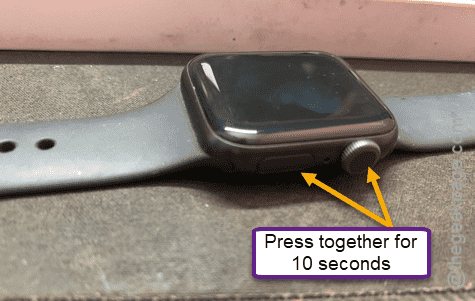
Once you have the device operational once again, you can expect the links are working or not. You should not have any problem accessing those links.
Fix 2 – Update the watch
The existing version of the Apple Watch may get this issue. So, if you look an update is pending on the watch, install it there.
Step 1 – At first, load up the Watch app on your iPhone.
Step 2 – In the Watch app, go to the “General” tab in there.
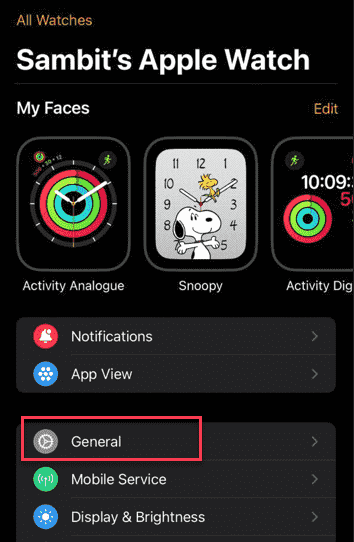
Step 3 – There, you will find the “Software Update” section. Load it up in there.
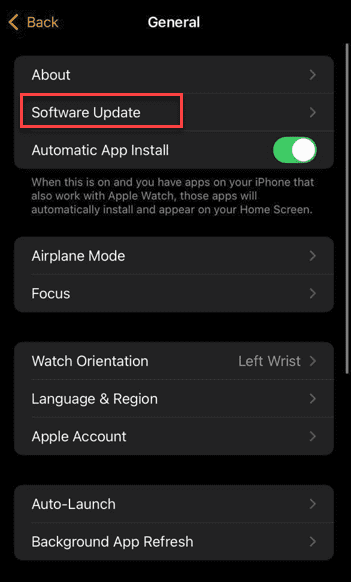
Step 4 – Once you see the pending update in there, use the “Install Now” or “Install Tonight” option, according to your preference.
After installing the updates on the watch, the problem with the browser on Apple Watch will be gone.
Check whether the webpages are accessible on the watch or not.