Verification is the most important in the process of transferring your data from your old iPhone to new one. So, after getting the new iPhone 17, if the verification failure is halting the backup process from your iCloud account, don’t worry. This issue can happen to anyone, irrespective of iPhone model. It’s a huge hassle, because every time the data transfer process fails, you have to reset your iPhone and restart the process from scratch. If you are frustrated with this problem, don’t worry. These workaround tricks have proven useful for the same affected users, so they will help you out.
Fix – Connect to your older iPhone’s hotspot
It seems that this problem is involves the network security, which you may bypass using the hotspot on your older iPhone and reconnecting to that during the reset procedure.
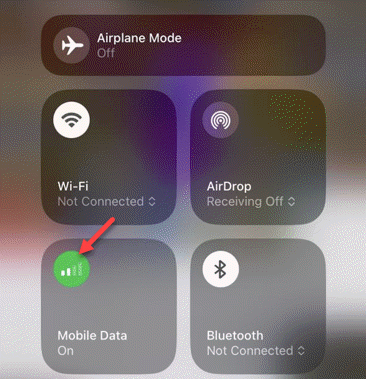
Step 1 – At first, turn on the Mobile Service. Next, load up the Settings page on the iPhone.
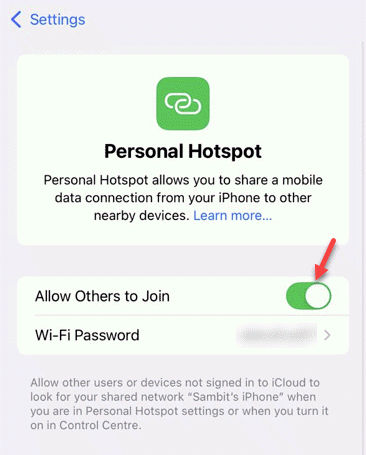
Step 2 – Then, go to the Personal hotspot and toggle the Allow others to Join mode to On mode.
Step 3 – After enabling the hotspot, load up the new iPhone Setup page. You will see the iPhone hotspot in the list of available Wi-Fi console page. Join it immediately.
Step 4 – Now, you may proceed with the Apple ID verification process, and it won’t fail.
Step 5 – Now, once you have set up the iPhone successfully, i.e. logged in with your Apple ID without any verification failure, you may connect to your regular Wi-Fi.
Step 6 – Now you may proceed with the rest of the backup and sync process from your iCloud account.
Check whether this works out for you.
What are the reasons behind the verification failure during iPhone 17, 17 Pro, 17 Air setup process?
Though some users speculates this to be a region-restricted issue, like the majority of complaints are from UK region, it is not the case. The data that you transfer from your older iPhone (iCloud account) is encrypted and can only be accessed by you using the Apple Passcode. During the transfer process, this security of the network connection may incur such verification failure events. Although it can just be a simple bug on iOS 26, but there are some measures like using the personal hotspot on the older iPhone seems to have fixed the issue for many affected users.
FAQs on verification failure during iPhone 17 setup process?
1. Can I transfer the data from my older iPhone to new iPhone 17?
Yes. You can transfer the data from your older iPhone to new iPhone 17 either via using a USB cable or the iCloud backup. Most of the users choose the wireless iCloud backup method that restores the synced data directly from their respective iCloud account. You can transfer the data during the main setup process of the new iPhone for a seamless experience.
2. How to transfer my data from my older iPhone to new iPhone?
After booting up your new iPhone, follow the setup process and connect to the Wi-Fi. Log in with the same Apple ID that you have on your older iPhone. Once you have logged in with it, you can transfer the data from your iCloud. Otherwise, you may connect the older iPhone to the new iPhone using a USB cable and complete the data transfer process.