Not getting any of your Snapchat alerts on the iPhone’s lock screen? If the Snapchat is not delivering alerts on the iPhone’s lock screen. There must be some problem with the Snapchat notification settings on the device. If you are interested to know more about the problem, you can go through the reasons we have presented there. We have also listed the solution to fix the issue on your iPhone.
Why am I not getting any Snapchat notifications on the lock screen?
The lock screen of iPhone is an important part of the device. We keep the device locked while we are working on something. So, much of notifications appear directly on the lock screen. Just take a quick glance on them, and we get to know a lot of it without even touching the device for once. The importance of the lock screen can not be ignored.
So, if you are not getting any Snapchat updates on the lock screen, there is an issue in the Lock Screen settings for the Snapchat app. You must amend the notification settings of the Snapchat app. You can do that just by following these easy steps.
Fix – Change the Notification settings
You have to just make some changes in the Notifications settings on your Snapchat app.
Step 1 – Try to find the ⚙ button on iPhone’s display.
Step 2 – Tap once to open it up.
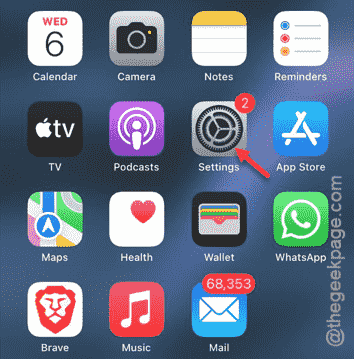
Step 3 – Now, you have to go to the “Apps” tab. This enlists all the apps on the device.
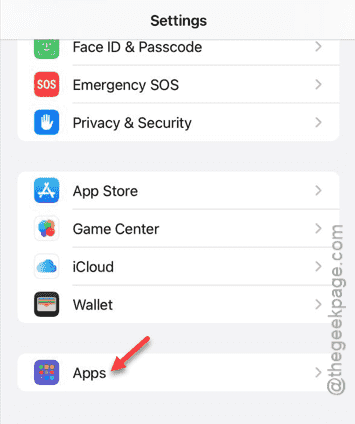
Step 4 – You have to find the “Snapchat” app in the list.
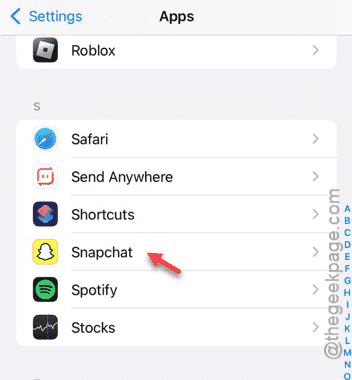
Step 5 – In the Snapchat settings, open up the “Notifications” module.
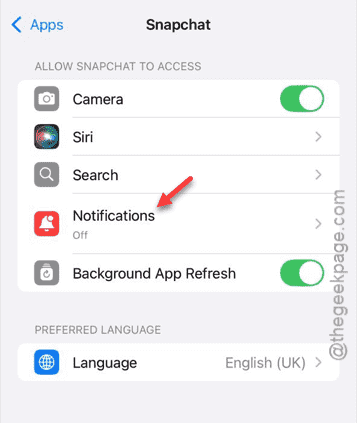
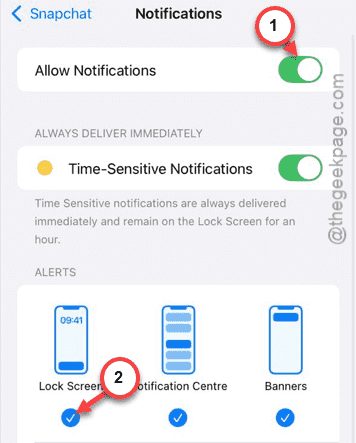
Step 6 – At first, turn on the “Allow Notifications” settings.
Step 7 – Switch on the “Lock Screen” module there.
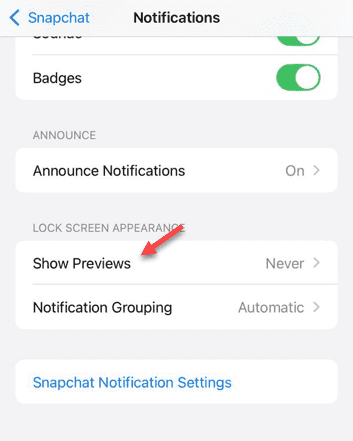
Step 8 – Slowly scroll down and open up the “Show Previews” option.
This feature controls what Snapchat information you shall get to view from the lock screen.
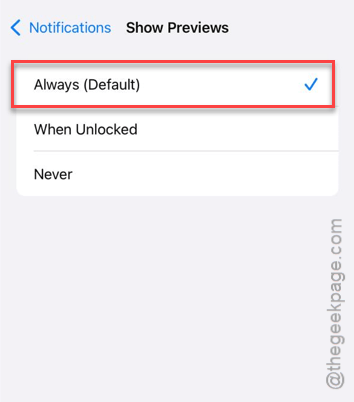
Step 9 – You must set this to “Always” mode.
This way, you will get all the details of the Snapchat alerts on the lock screen page.
Doing this should take care of the lock screen issue with the Snapchat app. See whether this works out!