Can’t see the Search bar on your iPhone Settings? iPhone Settings is a very intricate place, filled with various settings. So, the absence of the search bar from the top of the Settings page and can become an issue for you. These are the steps you need to follow to solve this case of absence of Search bar from the iPhone Settings.
Why the search bar is so important in iPhone Settings?
Your iPhone Settings is the only place from where you can access various tools and utilities of all the apps installed on the device. There are a ton of settings, utilities, accessibility shortcut, modifiers that it is next to impossible to recall the exact pathway of those. Search bar helps users to quickly reach the desired settings location and perform the needful changes.
The absence of this search bar from the iPhone settings in nothing but a glitch in the iOS. So, we recommend you to execute a force-restart procedure to restart the device on the go. That should be enough to retrieve the search bar in the iPhone settings.

Fix 1 – Swipe down from the top
If you can’t see the search bar after opening the Settings Home page, you can just swipe down and find it there.
Step 1 – Just open the Settings page.
Step 2 – Next, swipe down from the top once and you should see the search bar.

You can view the search bar in the Settings panel. Check whether you can see that there.
Fix 2 – Force restart the iPhone
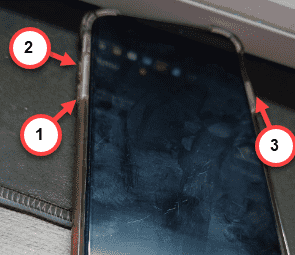
Force-restart the device to restore the search bar in the iPhone.
Step 1 – Close all the apps on your iPhone.
Step 2 – Next, hit the Volume Plus button in the device once.
Step 3 – Later, hold and release the Volume Minus button.
Step 4 – Press-hold the Power button of the iPhone. Do not let it go, even when the ‘Slide to power off‘ toggle shows up. Do press the key until the iPhone goes reboot.
Finally, when the iPhone gets back, see the iPhone Settings Home page. There will be the search bar that you are looking for.